![blue_logo-2.png]](https://support.princh.com/hs-fs/hubfs/blue_logo-2.png?height=40&name=blue_logo-2.png)
The 'Audit Logs' tab offers a comprehensive summary of your organization's actions in the Princh system, helping your organisation maintain transparency and support internal auditing needs.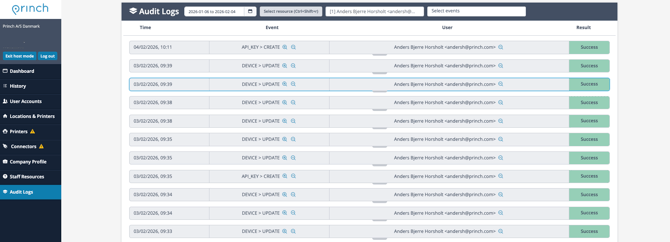
You can customise and filter the audit logs view using multiple different parameters:
- Time range filter
- You can filter and view audit logs for custom time periods using either the preset options or manually selecting specific dates
- Resource filter
- You can select and see audit logs for specific or multiple locations, printers or connectors
- User filter
- You can select and see audit logs for specific or multiple users
- Event filter
- You can select specific events/actions taken
- Action details
- You can see specific details for each event providing precise and valuable information about what exactly has been changed, ranging from anything between print job pricing to updating user accounts
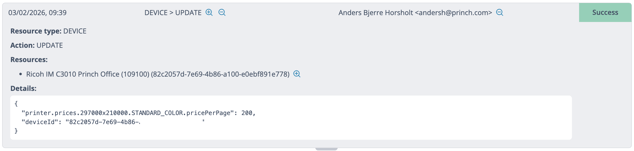
- You can see specific details for each event providing precise and valuable information about what exactly has been changed, ranging from anything between print job pricing to updating user accounts
If the 'Audit Logs' page does not appear for your account, it may be because it is not included in your Princh subscription or you're not logged in as administrator. For more information about how to add this to your subscription, please contact support@princh.com